IT fleet management is a crucial factor in the smooth operation and performance of a business. Whether you run a small startup or a large company, effectively managing your IT resources can make all the difference in terms of productivity and competitiveness in the market. In this article, we'll explore the importance of IT fleet management and how it can be optimized to maximize its benefits.
What is a company's IT fleet?
A company's IT fleet encompasses all of its hardware and software resources, such as computers, peripherals, software, printers, servers, and so on.
These are essential pieces of equipment for a company's operations. As such, managing the IT and equipment fleet needs to be optimized to ensure efficiency and time savings.
The Information Systems Department (ISD) is responsible for overseeing the company's IT systems. Its role is to assess the organization's needs, deploy the information system, and ensure it runs smoothly.
What does IT fleet management involve?
IT fleet management involves ensuring the functionality, security, and cost-effectiveness of a company's resources. Managing an optimal IT fleet involves monitoring, maintaining, updating, and regularly replacing hardware and software components.
The ISD is therefore involved in the precise tracking of the IT fleet, more specifically in:
- Deploying and maintaining the IT system to support productivity
- Overseeing IT maintenance to ensure its security and longevity
- Acquiring and renewing assets according to the company's needs
The benefits of effective IT equipment management
Optimized performance
Optimal management ensures the smooth operation of your IT equipment and, more broadly, of your organization as a whole. In particular, it helps avoid slowdowns or downtime, which can be costly and waste valuable time.
Stronger security
IT security threats are everywhere. Proper fleet management includes implementing robust security measures, such as regular updates, firewalls, and data protection protocols. Here, it's also important to involve employees, particularly through awareness campaigns on best practices and key points to watch out for.
Cost reduction
Proactive management of IT assets helps reduce costs over the long term. This includes avoiding major breakdowns and extending the lifespan of equipment. Several methods can help achieve this: server virtualization, software license optimization, conducting a precise inventory of equipment, reducing energy consumption, and so on. It's important to plan and monitor these measures regularly to get the best results.
4 tips for managing your IT system optimally
Conduct a precise inventory
The first step is to draw up a list of all the company's IT assets (computers, servers, software, etc.). After that, data needs to be collected to gather precise information about each resource (resource name, serial number, purchase or rental date, warranty date, the employee it's assigned to, etc.).
Once this step is complete, the next task is to track their condition and usage in a dedicated file. This will give you a detailed history of your equipment. Keeping an inventory of your IT equipment also saves time when it comes to making decisions.
Plan events and updates
For an IT fleet to run smoothly, it's essential to set up a calendar to manage various events in real time. This can include equipment maintenance, software updates, contract end dates, and so on. Regularly tracking these elements ensures the fleet runs smoothly and efficiently.
Set up continuous monitoring
Use monitoring tools to track system performance in real time. This allows you to quickly identify potential issues and resolve them before they become major problems.
Manage security
Managing the security of an IT fleet is a major challenge, for several reasons. It can be linked to protecting sensitive data (financial information, customers' personal data, etc.). Protecting this data is essential to prevent leaks, losses, or unauthorized access. It can also involve preventing cyberattacks, which can pose financial or reputational risks. Legal and regulatory compliance, as well as internal disruptions, can also justify strengthening IT security.
It's therefore advisable to implement strong, important security protocols: two-factor authentication, data encryption, employee security awareness training, and so on.
Outsourcing or managing your company's IT equipment in-house?
IT outsourcing: delegating to an external provider
IT outsourcing involves delegating part or all of your IT fleet management to an external provider. This can include maintenance, security, user support for your IT fleet, and so on.
An IT outsourcing company allows businesses to focus on their core activities and hand this management over to experts.
Using management software to oversee your IT fleet in-house
Managing an IT fleet is a complex, time-consuming task. Equipping yourself with IT and equipment management software offers many benefits and saves valuable time.
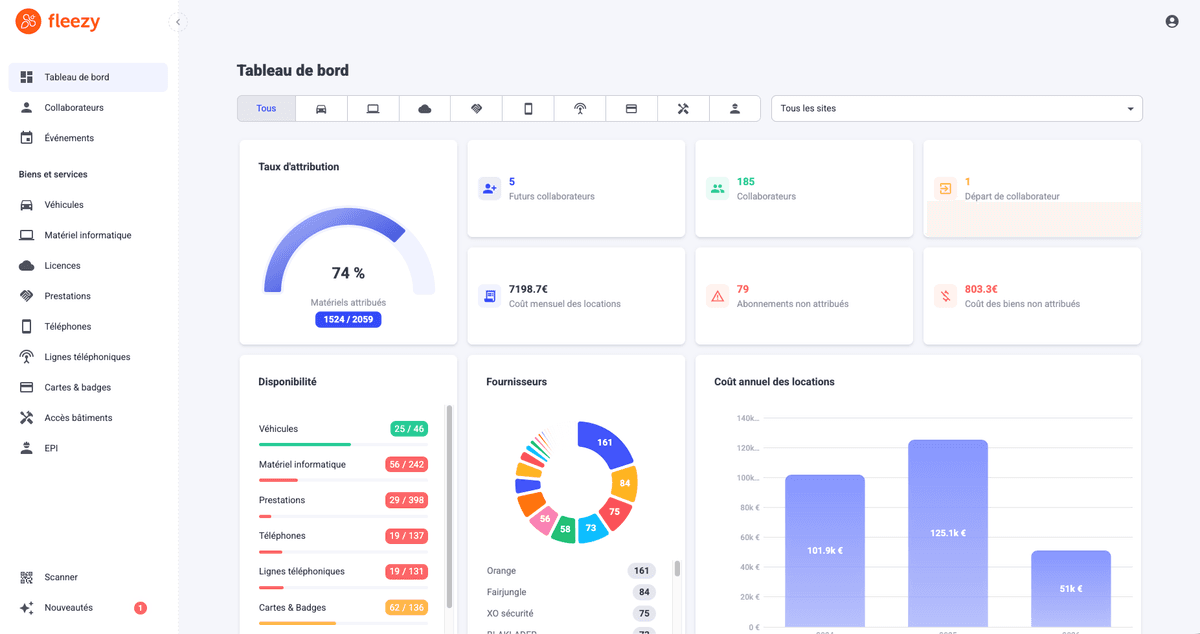
The first benefit of using a management tool is gaining full visibility over your assets. It makes it easy to carry out an inventory and get a complete view of your infrastructure through customizable dashboards. This way, you can analyze your asset data and make informed decisions, particularly to optimize costs.
Setting up notifications and alerts for events related to your fleet is also valuable. This way, you never miss a deadline and can ensure the performance and security of your equipment.
Software is also useful for tracking, in real time, which resources are assigned to which employees. This makes it easier to prepare confidently for the arrival of new employees. When an employee leaves, it also provides an opportunity to better manage equipment return and avoid losses.